Showing posts with label LINUX. Show all posts

Saturday, October 20, 2012

10 Things To Do After Installing Ubuntu 12.10

After the thrill of downloading it, and the jagged nerves from installing it, you may be wondering what to do next with your freshly installed copy of Ubuntu.
That question is especially true if you’re new to Ubuntu or haven’t used it for a while.
So, to help get you settled, we’ve listed our top 10 post-install must-dos…

1. Get Up to Speed

Whether you’re new to Ubuntu or are already a fan, the latest version of the OS sports some slick new features that are worth knowing about. From super quick app installs, to getting BBC News, GMail and Facebook alerts on your desktop, there’s lots to learn.
To bring you fully up-to-speed we’ve primed a video run-down of the 10 most exciting new features in Ubuntu 12.10…

2. Check for Updates

You may have a fresh install of a brand new release but that’s doesn’t mean it’s a finished product; there may be a few last-minute bug fixes ready and waiting to be installed.
Typically Ubuntu will automatically check for new updates every few days but as this is ‘day one’ for you we’ll need to do this manually.
Open the Dash (by clicking the button at the top of the screen) and search for ‘Software Updater’.

The Software Updater app will then check for any fixes and upgrades, and prompt you to install any that are waiting.

3. Install Media Codecs

For legal reasons Ubuntu can’t provide certain music and film codecs ‘out of the box’.
That’s not to say they aren’t available or easy to install – the Ubuntu installer gives an option to do this during installation.
But if you didn’t notice that option – and it is easy one to miss – there’s no need to panic: the most common music and video codecs can be installed through the Ubuntu Software Center.
Hit the button below to begin.

4. Add your Online Accounts

Setting up chat and social apps has been made easier in Ubuntu 12.10.
Rather than having to manually enter the same details in every app you want to use you can now add it once to  ’Online Accounts’ – a centralised hub housing login data that other applications can use.
To get started with Online Accounts click the ‘System Settings‘ icon (the ‘cog and spanner’) in the Unity Launcher, followed by the ‘Online Accounts‘ tile inside. Then hit the ‘Add Account’ button to begin.
Services supported include Aol, Windows Live, Twitter, Google, Yahoo!, Facebook (including Facebook Chat), Flickr, and many more.
Apps that ‘hook in’ to Online Accounts include IM app Empathy, social client Gwibber, and photo manager Shotwell.
Something to note: when no accounts are set up the Messaging Menu won’t be shown. Only as you add accounts will this appear, and entries within it are ‘on-demand’.
For example, if you don’t use Thunderbird for e-mail, you won’t see a Thunderbird entry in the messaging menu until you set it up.

5. Integrate Some Web Apps

A headline feature in Ubuntu 12.10 is the introduction of innovative ‘Unity Web Apps’ – a feature that integrates over 30 popular websites with elements of the Ubuntu desktop.
For example, add GMail and you get fancy Gmail options in the Launcher and Messaging Menu; enable BBC News and you’ll get notification alerts on new headlines, and so on.
To get started just visit one of the supported sites (we have a full list here) and look out for the ‘install’ pop-up as pictured in the screenshot above.

6. Adjust Your Privacy Settings

To speed up your workflow the Unity Dash presents you with an overview of your recent app and file activity. But you might not want everything to be tracked.
The Privacy options available in the System Settings panel let you choose what files, folders, and content is logged and what isn’t, and offers buttons to ‘clear’ data from given periods.

7. Enable Hardware Drivers

Unlike years gone by Ubuntu works with most hardware pretty flawlessly, without the need to hunt down and enable ‘proprietary drivers’.
But if your after a performance boost, looking to play 3D games, or want to get the most out of Ubuntu you may want to check for (and enable) accelerated drivers.
To do this, open the Software Sources app via the Dash (or through System Settings) and hit the ‘Additional Drivers‘ tab.

8. Disable (or remove) the Shopping Lens

Not everyone will appreciate one of Ubuntu 12.10′s more controversial new features – that of Amazon product suggestions appearing in the Dash as you search for apps.
As the feature can be switched off in a click or two there’s not need to avoid Ubuntu altogether.
Open the Privacy pane of System Settings and set ‘Include Online Results’ to ‘Off’.
Be aware that switching this ‘off’ will also affect the Music, Google Docs and Video lenses.
If you want to keep these working as normal, but don’t want this feature, open aTerminal and run:
sudo apt-get remove unity-lens-shopping

9. Set up Ubuntu One

Ubuntu One is a free cloud storage service available to everyone – Ubuntu users or not. You get 5GB of space for free in-which to store files, photos, music and more.
There are apps for iOS, Android, Windows, and OS X, meaning that it’s never been easier to have your life in sync and in reach wherever you are or whatever you’re using.
To get started hit the ‘Ubuntu One’ icon on the Launcher and follow the prompts that appear.
If you already have an Ubuntu One account then hit the ‘Sign In’ button to start syncing your files to your new desktop.

10. Enjoy It!

We always end our bi-annual run-down on a cheesy but important point: take some time out to just use Ubuntu 12.10 as it was intended.
There’ll be plenty of time to tweak, install, hack, and rejig parts of it over the coming days, so spend an hour or two just use it like anyone else would: check your Facebook or Google+ profile, chat to your mates on Empathy, type up a letter in LibreOffice, find some awesome cat videos in the Unity Video Lens, etc.

Friday, October 19, 2012

Ubuntu: The Complete Introduction for Beginners

WARNING: The following article is infected with Ubuntu. We suspect you would start using Ubuntu after reading it. Ubuntu is also known to be highly addictive. Read at your own risk.  ubuntu is linux based operating system with the origin in south africa. Its name means "humanity towards others". Back in 2004, Linux was already established as a server operating system, but free software was not yet a part of everyday life. Further, Linux was thought of as a complicated operating system which non-technical people could not use. It was at this time in 2004 that Ubuntu began as a Linux distribution aimed at ease of use. Mark Shuttleworth, the creator of the project, gathered a few developers and went on to create the most popular Linux distribution till date.

An Introduction to Ubuntu project

The Ubuntu project is aimed at creating one of the easiest operating system on the planet using linux as its base. Ubuntu relaese a new version every six months; the latest at the time of 12.04 LTS. The next anticepted edition, 12.10 will be out next year. We hope you have already understood the subsequent pattern of version numbers: 9.10,10.04,10.10,11.04,11.10,12.04 and so on. Ubuntu places alongside these numbers names of animals to infuse life into each realese. The 11.04 version is named as "Natty Narwhal"(a medium-sized toothed whale). Yet another unique fact about Ubuntu is that its owners(or you could just call them the creators) at the parent company Canonical have pledged to always keep the OS free. On the other hand are companies who built over and around their open source products,especially Linux distribution such as Novell and Red Hat. They usually treat the free versions of their Linux distributions as a testing ground for commercial products. Canonical promises that Ubuntu is, and always will be, free of cost and open in nature. As far its bank accounts are concerned the OS is a volenture driven project and the company capitalises on its Ubuntu related support and development services to enterprises. The commitment of Canonical and Mark Shuttleworth are to be credited for the ever-growing fame of Ubuntu.

Why is Ubuntu popular ?

or these who interested in computing, Linux is something which they take pride in being a user of, and love its freedom and flexibility. Among all the Linux distributions, which already are extremely popular (use Google's free keyword tool to avail salvation fr yourself), Ubuntu is the most popular. The reason for its triumph over all other Linux distributions is its ease of use. Before Ubuntu came into picture, Linux was thought of as a real tough nut to crack. Many had the(wrong) notion about Linux being a completely command line based operating system. While it is still true that an extremely rich set of useful applications,programs and features of Linux are dependent on command line (or call it the console), Linux certainly was much more than ust a console-driven, type and press enter styled operating system, even before Ubuntu was born. The one thing is lacked was the real ease of use offered by other operating systems such as Windows and Mac. Ubuntu change the scene with its innovative solutions to issues. It ensured that user could download new software easily. The OS was further popularised by the fact that it allowed you to use the system right from the CD and install it only once you felt pleased enough. The installer was simple and the looks were different\ and beautiful. Ubuntu software updates were fuss-free even for the regular user to understand. One of its most innovative technical aspects was its self upgrade feature. You didn't need to download a seperate ISO file, burn it to a disk and then install or update from it. All you had to do was upgrade from within the OS. The required files would automatically be downloaded and installed. Version changed ! Slowly, many other innovations came in: a music store (just like Apple), a software center, integration of music players and social service into GNOME shell and what not. It's these little changes overtime that increasingly increased the interest of new as well as already interested users . The cherry on the topping was the awesome 'no drivers required' approach . Ubuntu made it easy for users to plugin their mobile phones , select there country , fill in a few details and get ready with a GPRS,EDGE and 3G connection. This was , and still is, a huge boost for people (Mostly students) who live in places where they cant afford to have wired connections or costly wireless plans . For some users the last mentioned feature (built-in drivers) is most important. although you won't find pentium 4 processors in the market anymore, some still use such machines just because it does all they want it to do. These users don't upgrade either due to monetary problem or because they are simply happy with the PC which taught them what a computer is. The bigger problem with owners of boxes such as these is more on the side if support then features. If you lost the only copy of the drivers CD of the mother board for a P4 computer today, you will be force to buy a new system. The reason is lack of support from the manufacturer. In all probability, manufacturer would have stopped supporting the device. So you would not get the drivers on their website, with little luck getting it else where either. Since the Linux kernal has a huge database of drivers, Ububtu gives in reason to rejoice. It brings life back to such old PCs. While system requirements of most others new operating systems for running are high, Ubuntu does not need much to get great performance from older machines. While 512 MB RAM might seem a little less for windows 7 or Windows Vista, Ubuntu cannot only be used on such systems but can also perform pretty decently. In case that description suggests even in the slide test of bays that Ubuntu(or any other Linux) Distribution. is meant to run on slow devices, you might be enlightened to know that most super computers in the world today use Linux as their operating system. All these facts and features make Ubuntu more popular than any other Linux distribution.

Who can use Ubuntu ?

If you bear to ask this question to the creators of Ubuntu, they would say 'anyone',and they would not be wrong. Ubuntu comes with almost all software which you would required as a normal computer user. We know demands differ, so let us look at the valley from different mountains:

Home Users:

The term 'Home User' would almost automatically ask your creative side to form an image of a person who enjoys using a computer for entertainment and a few not- so- important tasks. That would include music for passing the boring Sunday evening, a few movies to make your self smile, email to keep you posted, web browsing to stay updated, a messaging client to chit chat with friends and probably a spreadsheet to help keep expenses in limit. Ubuntu comes with all of this. Its got 'banshee' to play your music, the 'totem' video player to play the movies, 'Evolution' to manage your calander, contacts and emails, Firefox to browse the mighty online mess(although beautiful and organised, the web is a mess after all ! ), 'empathy' for chatting with friends on yahoo, Google talk and others and 'Libre office' for your office need. We believe that is what a home user would won't from his/her computer. However,in case an Ubuntu aficionado wants more, installing software on this OS is a piece of cake (more about it later).

Office User:

The typical office user fiss data into spreadsheets, creating PPTs to be shown to clients and/or typing in a leave letter. Despite the change in definition of offices or its users almost all software manufacturers (including microsoft) continue to consider "office applications" as a set of software use for creating documents, PPTs, spreadsheets and small database applications. Ubuntu comes with an office suite named Libre Office (Libre means open) which is similar to and compatible with the Microsoft office range of applications. In Addition to the documents,spreadsheets,PPTs applications, it also comprises two other programs named 'Draw' and 'Math' which can be used to create illustrative drawings and complex formulas for office purposes. Math is unique to Libre office because it is a full fledged formula editor. You could not ask for more.

Who Can'y Use Ubuntu

This is one question which depends heavily on the needs. If you are a hard core gamer, Ubuntu probably is not for you. If you want to blame it on Linux, we suggest you change your mind. While their are games made for Ubuntu, the most popular games(we believe your brain is running a pronunciation simulation for spellings like 'crysis', 'need for speed', ) etc. Were never meant to be run on Linux platform. Although 'wine' and 'play on Linux' exist, a clean run cannot be promised, not by us at least. You might also not like Ubuntu if you are a designer. Most desktop design and publishing software are not available for Linux. So if you have produced all your great graphics using adobe's photoshop software, you would not be able to open those beautiful projects inside GIMP as they do not get alomg well. It is a summery of who cannot use Ubuntu is expected, we had encapsulate it in one sentence : anyone , whose previous life has been on influenced by closed source software so much that he cannot survive without it, might not be able to use Ubuntu. At the same time, its our duty to remind you of to great terms: wine and virtualization.

Tuesday, March 27, 2012

Ubuntu 12.04

15 New Photo Wallpapers Chosen for Ubuntu 12.04


From a pool of thousands, 15 photographic wallpapers have been chosen for inclusion in Ubuntu12.04
As with previous releases, the submissions were picked through an open contest run on social networking site Flickr.
Ubuntu 12.04 Wallpapers
The default wallpaper for Ubuntu 12.04, which will, once again, be an iterative update to the current ‘purple salad’ wallpaper, is expected to land ahead of Ubuntu 12.04 Beta 2 next week.

Download Ubuntu 12.04 Wallpapers

A .zip file containing the wallpaper set can be downloaded using the button below.

Unity 5.8 Lands in Ubuntu 12.04


Unity 5.8 landed in Ubuntu 12.04 this weekend – but what’s new and what’s improved? Let’s take a quick gander… 
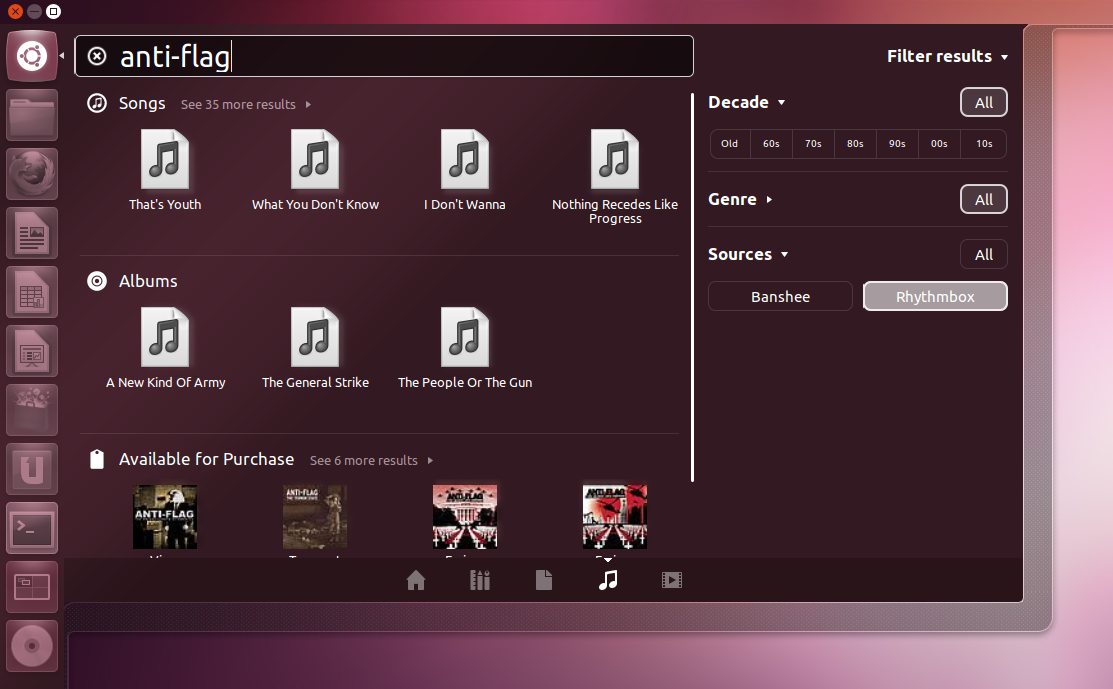
The Music Lens has added support for Rhythmbox:
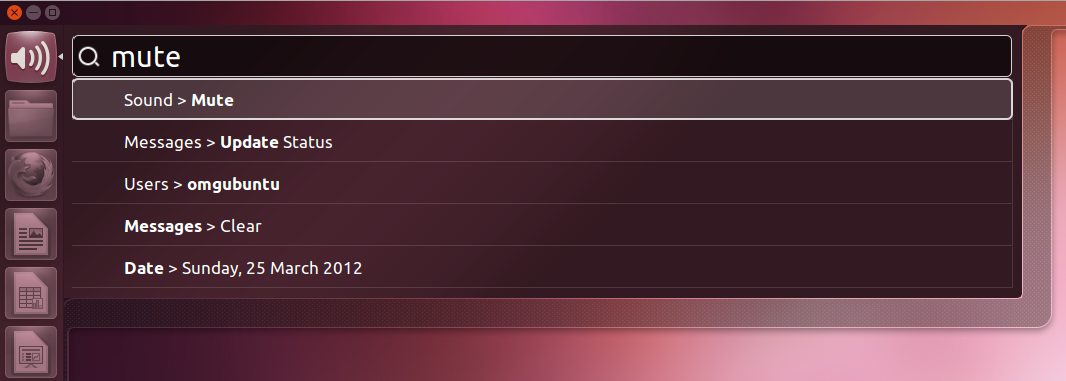
The Dash now tells you when it can’t find a file, app or folder related to a search: -
Dash 'no results' text added to Unity
The HUD now adapts to your Launcher auto-hide and icon-size settings:


Ubuntu 12.04 CD to Give WUBI The Boot


There are many ways to install Ubuntu on a computer, some of which are simpler and easier than others.
WUBI (Windows Ubuntu Installer) is an example of the easy approach. It offers the Ubuntu curious a relatively safe way to install Ubuntu on their PC from withinWindows – negating the need for disk partitioning and adding an easy way to ‘uninstall it’ through Windows ‘Add or Remove’ feature.

Current Behaviour

Currently, when a user inserts an Ubuntu CD or USB image into a computer running Windows, a window pops up with a set of options. Once of these is to proceed with installing the OS under Windows. The following simple-screen is then presented.
Ubuntu_Wubi_11.10
But changes to way the way the tool is provided in Ubuntu 12.04 are now being discussed.

Disabling Installation

Canonical’s Rick Spencer, in a mail to the Ubuntu Development mailing list, proposes disabling the ‘install’ feature when an Ubuntu 12.04 USB or CD is inserted into a computer running Windows.
This change, he argues, would be of overall benefit to Ubuntu users and Windows users: -
1. We will be able to do maintenance and enhancements to wubi outside of the Ubuntu development cycle.
2. Significant reduciton of QA work for an already over-streched QA team.
3. Better overall 12.04 quality, and less stress at release time.
4. We won’t get stuck with a poor (or worse) user experience on the CD since is a good chance that wubi will not work properly with Windows 8.
I am proposing these changes to the plan because:
1. The key use case for wubi is being able to download and run the installer on Windows, not installing from the ISO.
2. Wubi is difficult to test, so has been difficult to assure that it will meet the quality standards we have set for 12.04.
3. There are no developers treating wubi as their top priorities. This combined with the QA difficulties has historically caused late breaking changes that add stress at release time and frequentily invalidate already executed ISO testing.
4. Most significantly, Windows is changing it’s boot system with Windows 8, and it’s not clear how wubi will work with Windows 8, if at all.

Ubuntu 12.04 Multi-Monitor Launcher Behaviour Decided


We recently ran a poll in conjunction with the Ubuntu Design Team to seek out your preferred option for the default Unity launcher behaviour for multi-monitor usage in Ubuntu 12.04.
Almost 13,000 of you voted in that poll, and, based on those results, a decision on the default behaviour has been decided by the Ubuntu Design Team.
By default only one launcher on one monitor will be in use in Multi-Monitor set-ups. An option to enable the launcher on every monitor attached will also be available, so if the default set-up isn’t to your tastes you won’t be left crying.
Work on landing the code for the new multi-monitor behaviour is now underway.
Multimonitor Unity poll