Showing posts with label Logical Thinking Tips. Show all posts

Monday, January 28, 2013

How to Block Websites Without Software

Lets assume you need to block certain sites like Facebook, Orkut or any other site. We will Block certain Websites without using any software. We will directly edit the hosts file in windows, which will help us to Block any site. 

1. Navigate to C:\Windows\System32\drivers\etc
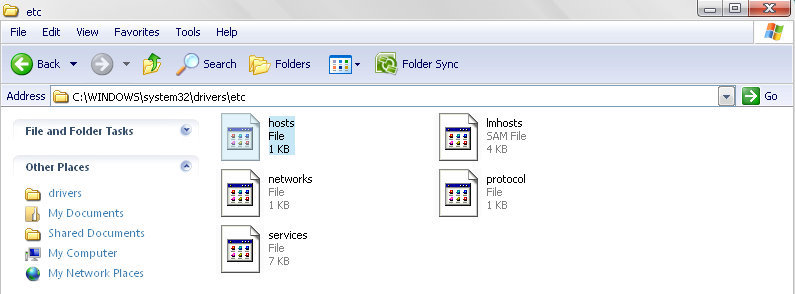


2. Open hosts file with any Text Editor (Open with Notepad).
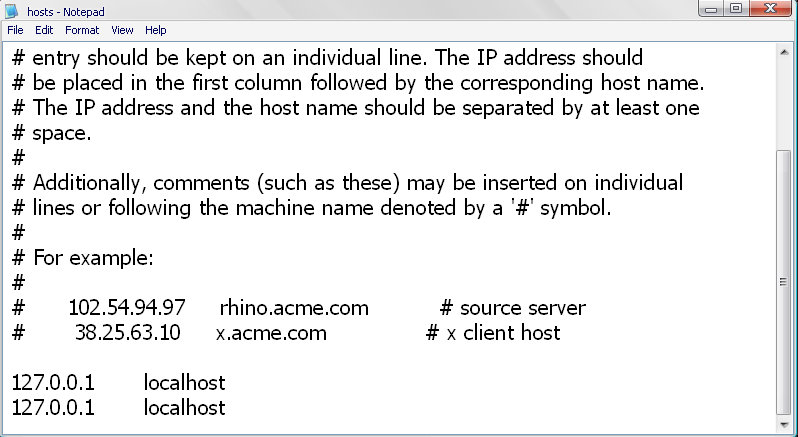


You will see these two lines in the file

127.0.0.1       localhost

127.0.0.1       localhost

Now Append the Second line with 127.0.0.2 and the website address you want to block.


For Example
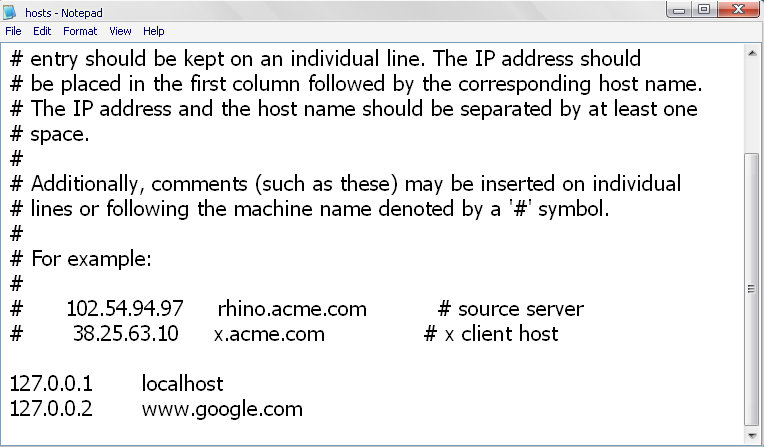


We have changed the Second Line as 

127.0.0.2        www.google.com 


3. Now Save the hosts File and Restart your Computer.

Now Open Google in any Browser, See It is Blocked on you Computer.
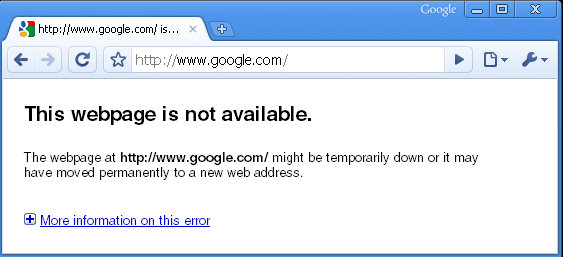


You can Block multiple websites by changing hosts file 

For Example :-

127.0.0.1       localhost
127.0.0.2       www.google.com 
127.0.0.3       www.yahoo.com
127.0.0.4       www.facebook.com

Create a Folder Without a Name

Follow the steps below to create a Folder without any Name :-

1. Firstly, Remove the old Name of the Folder. (Right click on Folder, Select Rename and click Delete) 


2. Then , press and hold down the ALT button and type 0160, then press Enter.

Important: Make sure you have switched on the NUM LOCK and Type "0160" from Numpad. 

Thursday, December 20, 2012

Why have I failed as an entrepreneur ?

  • I knew everything.
  • made a good sprint, but couldn't finish the run. No more oxygen/energy.

General

  • did not take care myself; emotionally and physically
  • did not listen people very well. I've heard them but did not actually listen. I kept on talking and talking.
  • being an expat and entrepreneur is somewhat crazy when you know you're going to have visa problems. Too much instability in one man's life drains too much energy.
  • did not use my time wisely
  • tried to do too much
  • should be less harsh on myself and others
  • was(am) stubborn when I should not be
  • was inconsistent ( ran ~90km in June '12 then in the last 6 months I only ran 30km )
  • did not ask for help

Business

  • never did true problem description. Should have write it down
  • should have connected with more people. Relationships matter a lot.
  • did not plan ahead the business
  • do not write a 100 page business plan does not mean don't write it at all
  • started working on other ideas and lost focus when business needed the most
  • should take the money when a beta user offered to pay
  • should have postpone opening company till we have a paying customer base.
  • should have asked money from people
  • rather than having a $400 Amazon EC2 instance, €30 p/m server was enough.

Programming

  • scalability problems should be solved when there are scalability problems.
  • have stuck in maker's obsession
  • wrote too much code. 30% became immediately unnecessary
  • did not prioritize what I should be working next
  • should have learnt Celery before
  • should have learnt Flask before
  • more Backbone less spagetti JS.
  • less code, less code, less code.
  • my job is not programming. My job is delivering value using programming.

The Product

  • should release the app much more earlier
  • should have fixed the showstopper bug and email users a.s.a.p. to say that we're sorry. ( Some users registered and tried the app when they shouldn't but since I left the Google login open, they've registered and saw a non-working app )
  • did not look for a market very well
  • did not able to explain the product in simple terms
  • did not try to sell the product, I've just build it
  • kept 600 people waiting for a demo while having a product
  • should have integrated payment gateway much more earlier
  • Facebook & Twitter do not have quality content

I am a fool. A big one.

Sunday, October 14, 2012

How Google works . Save the image and zoom it .......!!!!!!


Google runs on a distributed network of thousands of low-cost computers and can therefore carry out fast parallel processing. Parallel processing is a method of computation in which many calculations can be performed simultaneously, significantly speeding up data processing. Google has three distinct parts:
  • Googlebot, a web crawler that finds and fetches web pages.
  • The indexer that sorts every word on every page and stores the resulting index of words in a huge database.
  • The query processor, which compares your search query to the index and recommends the documents that it considers most relevant.

Difference Between Virus,Worms,Trojan and Spyware

                                     Photo: Difference Between Virus,Worms,Trojan and Spyware

We all have heard the terms Virus,Worms,trojans and spyware but only a few of us know the difference between them.We genreally consider everything that is detected by an antivirus as virus but this is not the case.The antivirus not only provides protection against viruses but it also protects us from trojans,worms and spywares.All these can be harmful to your computer hardware and software.Today I will differentiate all these terms from each other .

Ok lets start from the introduction of viruses

Virus:-A virus is a self replicating program that attaches itself to an executable file.When the file is executed the virus automatically gets executed and enters into system memory .Once it enters into system memory it either searches for other files that can be infected or stays in the background and infect the files that are uses the virus infected program.

Worms:Worms are very similar to viruses but differ in way that they donot bind themselves to executable files instead to replicate themselves they uses the network.If you find excessive use of your network bandwidth then you may be infected by a worm.So,a worm donot require a user to execute any file for its execution it can work without user intervention.

Trojan Horse:-A trojan horse is harmful program which may seem harmless to the user before its installation but instead it is programmed or reverse engineered to facilitate unauthorised remote access to the computer.Trojan’s donot replicate themselves.

Spyware:-A spyware is a program that secretly monitor and collects pieces of information.They usually run in stealth mode and cannot be detected easily.Keyloggers is a great example of spyware software.These are not limited to just spying but can also send data to remote computers . 

Article by KiRTi KuMaR
 
 
We all have heard the terms Virus,Worms,trojans and spyware but only a few of us know the difference between them.We genreally consider everything that is detected by an antivirus as virus but this is not the case.The antivirus not only provides protection against viruses but it also protects us from trojans,worms and spywares.All these can be harmful to your computer hardware and software.Today I will differentiate all these
 terms from each other .

Ok lets start from the introduction of viruses

Virus:-A virus is a self replicating program that attaches itself to an executable file.When the file is executed the virus automatically gets executed and enters into system memory .Once it enters into system memory it either searches for other files that can be infected or stays in the background and infect the files that are uses the virus infected program.

Worms:Worms are very similar to viruses but differ in way that they donot bind themselves to executable files instead to replicate themselves they uses the network.If you find excessive use of your network bandwidth then you may be infected by a worm.So,a worm donot require a user to execute any file for its execution it can work without user intervention.

Trojan Horse:-A trojan horse is harmful program which may seem harmless to the user before its installation but instead it is programmed or reverse engineered to facilitate unauthorised remote access to the computer.Trojan’s donot replicate themselves.

Spyware:-A spyware is a program that secretly monitor and collects pieces of information.They usually run in stealth mode and cannot be detected easily.Keyloggers is a great example of spyware software.These are not limited to just spying but can also send data to remote computers . 

Article by KiRTi KuMaR

Saturday, September 8, 2012

The 5 Most Common Problems New Programmers Face--And How You Can Solve Them

When you're just starting out with programming, it's easy to run into problems that make you wonder how anyone has ever managed to write a computer program. But the fact is, just about everyone else who's learned to code has had that experience and wondered the same thing, when they were starting out. I've helped teach several introductory programming classes, and there are some problems that trip up nearly every student--everything from getting started to dealing with program design. 

I'll prepare you to get past these challenges--none of them are insurmountable. 


Getting set up

Learning to program is hard enough, but it's easy to get tripped up before you even begin. First you need to chose a programming language (I recommend C++), then You need a compiler and a programming tutorial that covers the language you chose and that works with the compiler that you set up. This is all very complicated, and all before you even start to get to the fun parts. 

If you're still struggling with getting the initial setup, then check out our page on setting up a compiler and development environment (Code::Blocks and MINGW) which walks you through setting up a compiler with a lot of screenshots, and gets you up to the point of having an actual running program.

Thinking Like a Programmer

Have you seen the State Farm commercials where the car wash company returns the cars to customers with the soap suds still on the car? The company washes the car, but it didn't rinse it. This is a perfect metaphor for computer programs. Computers, like that car wash company, are very very literal. They do exactly, and only, what you tell them to do; they do not understand implicit intentions. The level of detail required can be daunting at first because it requires thinking through every single step of the process, making sure that no steps are missing. 
 

This can make programming seem to be a tough slog at first, but don't despair. Not everything must be specified--only what is not something the computer can already do. The header files and libraries that come with your compiler (for example, the iostream header file that allows you to interact with the user) provide a lot of pre-existing functionality. You can use websites like http://www.cppreference.com or our own function reference to find information on these pre-existing libraries of functionality. By using these, you can focus on precisely specifying only what is unique about your program. And even once you do that, you will begin to see patterns that can be turned into functions that wrap up a bunch of steps into a single function that you can call from everywhere. Suddenly complex problems will begin to look simple. It's the difference between:
Walk forward ten feet
Move your hand to the wall
Move your hand to the right until you hit an obstacle
...
Press upward on indentation
and
Walk to door
Find light switch
Turn on light
The magic thing about programming is that you can box up a complex behavior into a simple subroutine (often, into a function) that you can reuse. Sometimes it's hard to get the subroutine done up just right at first, but once you've got it, you no longer need to worry about it. 

You can go here to read more about how to think about programming, written for beginners.

Compiler Error Messages

This may seem like a small thing, but because most beginners aren't familiar with the strictness of the format of the program (the syntax), beginners tend to run into lots of complaints generated by the compiler. Compiler errors are notoriously cryptic and verbose, and by no means were written with newbies in mind. 

That said, there are a few basic principles you can use to navigate the thicket of messages. First, often times a single error causes the compiler to get so confused that it generates dozens of messages--always start with the first error message. Second, the line number is a lie. Well, maybe not a lie, but you can't trust it completely. The compiler complains when it first realizes there is a problem, not at the point where the problem actually occurred. However, the line number does indicate the last possible line where the error could have occurred--the real error may be earlier, but it will never be later. 

Finally, have hope! You'll eventually get really really good at figuring out what the compiler actually means. There will be a few error messages that today seem completely cryptic, even once you know what the real problem was, that in a few months time you will know like an old (if confused) friend. I've actually written more about this in the past; if you want more detailed help, check out my article on deciphering compiler and linker errors.

Debugging

Debugging is a critical skill, but most people aren't born with a mastery of it. Debugging is hard for a few reasons; first, it's frustrating. You just wrote a bunch of code, and it doesn't work even though you're pretty sure it should. Damn! Second, it can be tedious; debugging often requires a lot of effort to narrow in on the problem, and until you have some practice, it can be hard to efficiently narrow it down. One type of problem, segmentation faults, are a particularly good example of this--many programmers try to narrow in on the problem by adding in print statements to show how far the program gets before crashing, even though the debugger can tell them exactly where the problem occurred. Which actually leads to the last problem--debuggers are yet another confused, difficult to set up tool, just like the compiler. If all you want is your program to work, the last thing you want to do is go set up ANOTHER tool just to find out why. 

To learn more about debugging techniques, check out this article on debugging strategies.

Designing a Program

When you're just starting to program, design is a real challenge. Knowing how to think about programming is one piece, but the other piece is knowing how to put programs together in a way that makes it easy to modify them later. Ideas like "commenting your code", "encapsulation and data hiding" and "inheritance" don't really mean anything when you haven't felt the pain of not having them. The problem is that program design is all about making things easier for your future self--sort of like eating your vegetables. Bad designs make your program inflexible to future changes, or impossible to understand after you've written. Frequently, bad design exposes too many details of how something is implemented, so that every part of the program has to know all the details of each other section of the program. 

One great example is writing a checkers game. You need some way to represent the board--so you pick one. A fixed-sized global array: int checkers_board[8][8]. Your accesses to the board all go directly through the array: checkers_board[x][y] = ....; Is there anything wrong with this approach? You betcha. Notice that I wrote your accesses to the board all go directly through the array. The board is the conceptual entity--the thing you care about. The array happens to be, at this particular moment, how you implement the board. Again, two things: the thing you represent, and the way you represent it. By making all accesses to the board use the array directly, you entangle the two concepts. What happens when you decide to change the way you represent the board? You have an awful lot of code to change. But what's the solution? 

If you create a function that performs the types of basic operations you perform on the checkers board (perhaps a get_piece_on_square() method and a set_piece_to_square() method), every access to the board can go through this interface. If you change the implementation, the interface is the same. And that's what people mean when they talk about "encapsulation" and "data hiding". Many aspects of program design, such as inheritance, are there to allow you to hide the details of an implementation (the array) of a particular interface or concept (the board). 

Now go eat your spinach! :) 

A good follow-up to learn more about these issues is to read about programming design and style. 

For a more advanced article on this topic, you can go here and read about object oriented class design. 

Another way to make your program more easily modified in the future is to clearly comment it.

5 Ways You can Learn Programming Faster

Learning to program isn't something you can do in an afternoon, but it doesn't have to be a life's work, either. There are lots of things you can do to make it easier on yourself when you are learning to program. You already know about The 5 Most Common Problems New Programmers Face--And How You Can Solve Them. Now, discover how to get the most out of your learning. 

One common theme across many of these tips is: 

don't go too fast; get it right before moving on.

When I was teaching C, there were always a few students who came into the class knowing a bit about programming. Inevitably, some of these students did great in the first few weeks only to fall further and further behind as the course went on. Why? They went too fast through the introductory part of the course, thinking they knew it all--but they rarely did. They knew some of the material, but not enough to have a strong grasp of the fundamentals. 

At the same time, you must not stop making progress--you can go too slow as well as too fast. Don't avoid a topic after you've mastered everything leading up to it. By facing more challenging ideas, you'll help cement your grasp of the basics.

1. Look at the Example Code

Reading is usually about the words on the page, but learning to program is about code. When you're first learning to program, you should make sure to look at, and try to understand, every example. When I first learned to program, I would sometimes read the code examples before the text, and try to figure out what they did. It doesn't always work, but it did force me to look at the example very carefully, and it often helped make the writeups clearer. 

If you want to see what sample code looks like, you can read this site's introductory programming tutorial. This tutorial spends a great deal of time talking about the sample code to help you work through exactly what the code does.

2. Don't Just Read Example Code--Run It

But when you're reading a programming tutorial (or book), it's easy to look at the sample code and say "I get it, I get it, that makes sense". Of course, you might get it, but you might not get it, and you just don't know it. There's only one way to find out--do something with that code. 

If you haven't already, get a compiler like Code::Blocks set up. 

Then type the sample code into a compiler--if you type it, instead of copying and pasting it, you will really force yourself to go through everything that is there. Typing the code will force you to pay attention to the details of the syntax of the language--things like those funny semicolons that seem to go after every line. 

Then compile it and run it. Make sure it does what you think it does. 

Then change it. Software is the most easily changed machinery on the planet. You can experiment easily, try new things, see what happens; the changes will happen almost immediately, and there is no risk of death or mayhem. The easiest way to learn new language features is to take some code that works one way, and change it.

3. Write your Own Code as Soon as Possible

Once you understand something about the language--or even if you're still getting your head around it--start writing sample programs that use it. Sometimes it's hard to find good ideas for what programs to write. That's OK, you don't have to come up with every idea at the beginning. 

You can find some programming challenges on this site. 

You can also reimplement the examples from the book or tutorial you are reading. Try to do so without looking back at the sample code; it won't be as easy as it seems. This technique can work especially well if you tweak the sample code. 

If you can't think of a small program to write, but you have in mind a larger program you want to implement, like a game, you could start building small pieces that you can later use for a game. Whether you use them later or not, you will get the same useful experience.

4. Learn to Use a Debugger

I already talked about the importance of debugging in The 5 Most Common Problems New Programmers Face--And How You Can Solve Them. But it bears repeating; the sooner you learn good debugging techniques, easier it will be to learn to program. 

The first step in doing so is to learn how to use a tool called a debugger, which allows you to step through your code. 

A debugger will allow you to step line by line through a piece of code. It will let you see the values of variables, and whether the code inside an if statement is executed. 

A debugger can help you quickly answer questions about what your code is doing.
int main()
{
        int x;
        int y;
        if( x > 4 )  // <-- what is the value of x here?
        {
                y = 5;   // <-- did this line of code execute?
        }
}


A final word about debuggers: the first time you learn about a debugger, it will take you longer to fix the problems with your code. After the tenth or so bug, it will really start to pay off. And believe me, you will have way more than ten bugs in your programming career. 

I often saw students unwilling to use a debugger. These students really made life hard on themselves, taking ages to find very simple bugs. The sooner you learn to use a debugger, the sooner it will pay off.

5. Seek out More Sources

If you don't understand something, there's a good possibility the way it was explained just didn't click. 

First, look for alternative explanations. The internet is filled with information about programming, and some explanations work better for different people; you might need pictures, someone else might not. There are also lots of good books with detailed explanations. 

But if that doesn't work, the easiest way to figure out where your misunderstanding lies is to ask someone else. But try to go beyond saying, "I don't understand. Please explain." You're likely to get a link back to the same text you didn't understand. Instead, rephrase your understanding of the text in your words. The more your question reveals about what you are thinking, the easier it will be for a knowledgeable expert to answer it. Programmers sometimes have a reputation for being grumpy about answering questions, but I think the reason is that they want to make progress in a conversation, and that requires both sides to put in effort. If you ask a smart, detailed question that shows you are thinking, you will generally get good results. 

There are plenty of places you can go to ask questions. You can always email me, or post on our message board, or ask an expert.