Showing posts with label Tip And Tricks. Show all posts

Sunday, January 26, 2014

W3schools Offline Mode Latest Version Free Download

Hey friends Here I am giving you the offline latest version of w3schools for free download. Are you interested in web designing? I’m sure that most of you are interested. So you have to learn some basics in HTML, CSS, Java script to make your own website with great content and quality. If you have searched about web designing previously in Google you may have noticed that w3schools website ranks for most of the search terms. Yes they are since they are the most quality tutorial producers. But it must be sometime inconvenient to browse that website always online. What if this w3schools can be downloaded? Yes you can download the whole website now. Sounds crazy ? no its not.
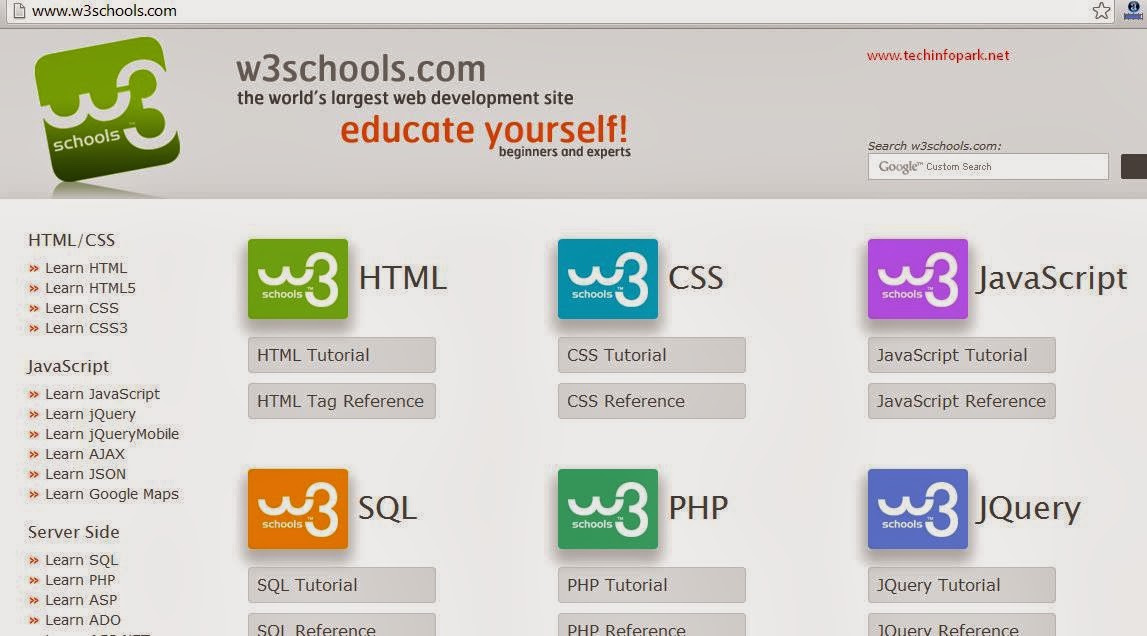
w3schools

Offline version of w3schools:

W3schools.com is the one of the best website that can used for learning nearly all most commonly used web designing languages. It serves us with tutorials on languages such as HTML, CSS, Java Script, PHP, SQL, Jquery. Now this website is available to download in the offline form.
On downloading this website in offline form you may be able to use most of this websites feature without any Internet connection you may gift this package to your friend who has a burning desire to developer knowledge in web designing field but no Internet connection.

How to use this?

Step 1:
First of all download the offline package of w3schools from the link given here. Don’t worry the size of the package is just ~2 Mb. Just download the package from the link given below.
Download : W3Schools Offline Latest Version
Step 2:
Now extract the package. The size of the package after extraction may be of up to 100+ Mb so keep some free space for it. The main file to open is situated in the folder www.w3schools.com . This folder has two files known as default. One is a notepad file and another is a html file. Double click on the html file. That’s it. w3screen1

This offline package is just for quick reference and beginning. Because it does not have any pictures and live demonstration can’t be done.
So for full usage and live demonstration you must use W3schools website.
Offline version of this website will just look like below. Happy Learning.
w3offline
 
Download : W3Schools Offline Latest Version

Monday, January 6, 2014

Do you know : 720p/1080p Means what ??

720p/1080p and similar others are resolution formats that you often find in video sharing sites, in TV advertisements or in video cameras.  Here is a quick explanation for what it means.
720p means that the screen has 720 horizontal lines and 1280 vertical lines. In other words it has a resolution of 1280 x 720. Similarly 1080p has a resolution  of 1920 x 1080. Both have an aspect ratio of 16:9, also known as widescreen. 720p and 1080p are usually advertised as HD and Full HD respectively in media. We also have 480p, known as Standard Definition (SD),  which has a resolution of 640 X 480 and an aspect ratio of 4:3.

resolution_chart_in-line_thumb[5]
So what does the ‘p’ stands for? Well the ‘p’ stands for progressive. We also have interlaced video denoted by ‘i’. Progressive means that each line in the image is built from top to bottom in each frame of the video. While in interlaced only half on the image, i.e. each alternate line is built in one frame and and the rest in others. For eg. if we have a video with 60 frames per second (fps) then in progressive each line would be built 60 times per second while in interlaced each line would be built only 30 times.

interlace_diagram_interlace_thumb[5]
Since interlaced displays only half of the picture in one frame, hence pictures often appear jagged or smeared especially in videos with fast action where the picture changes constantly. The progressive format is of course the dominating format today because it provides smoother and clearer pictures.  The only advantage of interlaced is that it requires less space and bandwidth to store and transmit a video of same resolution and frame rates than progressive ones.

Tuesday, June 25, 2013

5 Desktop Blogging Tools that will help you with your Blog writing

blogging 5 Desktop Blogging Tools that will help you with your Blog writing

If you’ve been blogging or freelance writing for some time, you will know how busy a blogger’s life can get. From the frequent writing to the continual maintenance, the work just doesn’t seem to stop. You wished you had more time to do all the work in. But the real problem doesn’t lie within the excess of the work. It lies in the management of time which a lot of people lend very little care to. If you’re a regular blogger, and want to maximize your throughput by optimizing your time, then you might be interested in some desktop blogging tools that will help you with your blog writing by automating some processes, and/or help you manage your blogging work.

1. Windows Live Writer

No blogger’s Windows PC is complete without a copy of the Windows Live Writer installed! It’s a pretty solid tool that comes with the Windows Live Essentials toolkit. And it is a pretty powerful word processor too, with many of the editing tools you get with Microsoft Word. And it gives you some advanced tools as well which you do not get from your blog’s post editor, such as tables, graphs, pie charts, histograms, etc.

You can set it up with any blogging platform, and any theme/template installed. You can write your posts in that same style, and preview it live on your PC. In fact, it is a complete blogging software, after using which you will not need to log into your blog’s dashboard to write or edit a post again.

2. BlogDesk

Another pretty handy desktop software for bloggers. This one is more for the pros, as the interface is minimalistic. But that isn’t to say it isn’t lacking. I mean sure, it doesn’t have the drag-and-drop functionality with images, but it has other pretty good tools such as the automatic tag generator, the most Frequently Used Phrases tool for re-using text snippets, and a lot more. I really love this tool, and even though I’m a fan of coding posts in HTML rather than typing them, I’d recommend this excellent WYSIWYG editor to every blogger out there.

3. Deepest Sender

Looking for something that’s more easily manageable than a full desktop application? Try this great Firefox extension instead. It’s a small, but really useful app that lets you quickly jot down ideas, drafts, and even final posts while browsing. Like a post you’re reading currently? Quickly launch this extension with a shortcut button, and start typing! You won’t even have to open a new tab for this.

4. Ecto

Not a Windows user? Well, I don’t blame you. And I have a solution for you if you’re using a Mac. Ecto has a pretty slick interface, and almost all the features you need in a desktop blogging software. One of the best things I like about it is the multiple blogging profiles you can set up and operate at the same time.

5. Thingamablog

Thingamablog is another popular desktop blogging client. It runs on Windows, Linux, and Mac, whichever you prefer.

It’s a standalone application that allows you to setup, manage, and update multiple blog from your desktop. In fact you have got the option to publish a blog entry via email!

Thingamablog has an integrated feed reader that you can use to get new ideas and topics for your posts.

So did you like this collection? What other blogging software are you using? Leave your comments in the comments section below!

Wednesday, January 16, 2013

Why Facebook, Twitter and google using Blue Logo??

Question for Programmers

Why is Facebook Blue in Color

Facebook has gone through some major redesigns in the past few years but one part that has more or less stayed the same in all those years is the site’s blue color.
Everything is so blue about Facebook right from the sign-up page to the logo, their mobile app and even the site pop-ups that have shades of blue. Why?
A New Yorker story on Mark Zuckerberg explains why Facebook is all blue in color. It says the young Facebook founder is color blind but can see blue:
"Colors don’t matter much to Zuckerberg; a few years ago, he took an online test and realized that he was red-green color-blind. Blue is Facebook’s dominant color, because, as he said, “blue is the richest color for me – I can see all of blue.”

Answer..--->
i)Colors don’t matter much to Zuckerberg; a few years ago, he took an online test and realized that he was red-green color-blind. Blue is Facebook’s dominant color, because, as he said, “blue is the richest color for me – I can see all of blue.”
"There were a lot of different color iterations," Kedar says. "We ended up with the primary colors, but instead of having the pattern go in order, we put a secondary color on the L, which brought back the idea that Google doesn't follow the rules."
(from an interview with Ruth Kedar by WIRED writer Sonia Zjawinski)

ii)
Blue colour doesnt strain your eyes, for example in any of your text documents turn background colour to blue and read the matter in it. and do the same with any other colours. you will feel the difference.

Monday, April 23, 2012

How To Log-in In Multilple Gtalk-Id On Same Computer...?

>>Whenever you want to Log-in into multiple G-Talk Id within same PC, you can't..
But here is a simple trick by creating shortcuts for G-talk and you can Log-in into that...


1.)Right click on desktop...

2.)Click on  New ->Shortcut

3.)Open the shortcut..Type in the text box....=> (with quote)  "C:\Program\Files\Google\Google Talk\googletalk.exe"/nomute

4.)Press Next in that wizard and give any name to this shortcut..


=>So you can create any number of shortcuts ,you want....!!!
                                   
                                                             >>Njoy Friends..!!

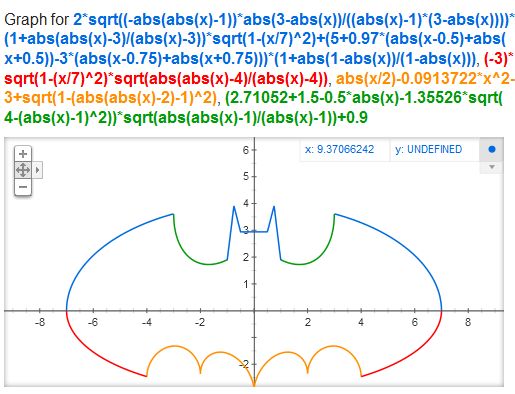
Batman Curve In Google Search Result..!!

>Paste the  following code in Google Search Bar and See the Result..
>It looks like Batman...!!

2 sqrt(-abs(abs(x)-1)*abs(3-abs(x))/((abs(x)-1)*(3-abs(x))))(1+abs(abs(x)-3)/(abs(x)-3))sqrt(1-(x/7)^2)+(5+0.97(abs(x-.5)+abs(x+.5))-3(abs(x-.75)+abs(x+.75)))(1+abs(1-abs(x))/(1-abs(x))),-3sqrt(1-(x/7)^2)sqrt(abs(abs(x)-4)/(abs(x)-4)),abs(x/2)-0.0913722(x^2)-3+sqrt(1-(abs(abs(x)-2)-1)^2),(2.71052+(1.5-.5abs(x))-1.35526sqrt(4-(abs(x)-1)^2))sqrt(abs(abs(x)-1)/(abs(x)-1))+0.9

Google Heart Shaped Curve..!!

>>Hi, Friends..Here You will find some amazing Funny pranks on Google.. 
>>You will find Your Heart..there..!!
>>Actually Google Provides this Graph Calculation and Plotting feature...in search bar..


(1)Copy and Paste into Searching Bar of Google Home Page..
 (sqrt(cos(x))*cos(75x)+sqrt(abs(x))-.7)*(4-x*x)^.2, sqrt(9-x^2), -sqrt(9-x^2) from -4.5 to 4.5, -x


(2)Type Following to get another Heart Shape..!!

(sqrt(cos(x))*cos(200x)+sqrt(abs(x))-0.7)*(4-x*x)^0.01, sqrt(9-x^2), -sqrt(9-x^2) from -4.5 to 4.5


(3)Type following in Search Bar for another Shape..!!

(sqrt(cos(x))*cos(200*x)+sqrt(abs(x))-0.7)*(4-x*x)^0.01,sqrt(9-x^2),-sqrt(9-x^2)


>>Enjoy Friends..!!